What do different colors and styles mean?
The colors help you to distinguish between the object types. They correspond to the object colors.
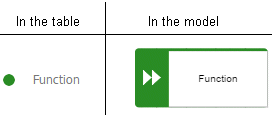
Example 4.
A table for a model of the EPC type contains, for example, green highlighting for functions because functions are displayed in green in the model. In a table for a BPMN diagram, a task appears in blue, as in the diagram.
A flashing cursor in an empty row indicates that entries can be made.
A gray background indicates that no entries can be specified.
Split paths are outlined by a thicker line.
In BPMN diagrams, lanes are outlined by a thicker line.