Create object definitions
Create object definitions that you want to create occurrences for later in models and create an object library. Thus, the required objects are available when modeling.
With the Designer license, you can create multiple objects of the same type at the same time.
Copy object names and attributes to the clipboard
In a text editor, enter the names of the new objects in separate lines.
To the right of the objects, enter the attributes separated by tabs.
Select all entries with Ctrl + A and copy them to the clipboard with Ctrl + C.
You can paste the contents of the clipboard into the Create Objects dialog to create new objects.
Insert object definitions
In a text editor, enter the names of the new objects in separate lines.
To the right of the objects, enter the attributes separated by tabs.
Select all entries with Ctrl + A and copy them to the clipboard with Ctrl + C.
You can paste the contents of the clipboard into the Create Objects dialog to create new objects.
Insert object definitions
Click
 Application launcher >
  Models and objects.
Click the
 database you want to use.
Select the database group in which you want to save the object definitions.
Click
 Create objects. The dialog opens.
Paste the clipboard content into the dialog by using Ctrl + V. The content is inserted into the dialog and rows are created for the symbol and attribute types.
In the Select symbol type header, click
 Configure to select the symbol type for all new objects.
In the Select attribute type headers, click
Configure to select the attribute type for all attributes of the column.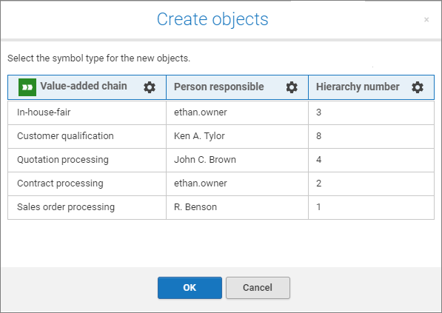
Click OK.
The object definitions are created in the group based on the selected object type.
Tip
Create occurrences of the objects in an overview model. This prevents the object definitions from being deleted unintentionally during a database reorganization.