Configure the integration
To configure the integration of ARIS Process Mining and ARIS Advanced, open both applications in parallel in separate web browser tabs. For some settings, you need to copy data from one application to the other.
Open the ARIS Advanced integration page in ARIS Process Mining
Open ARIS Process Mining.
Click the
 Navigation menu icon >
  Administration in the program header.
Click ARIS integration in the Administration panel.
The ARIS Advanced integration page opens.
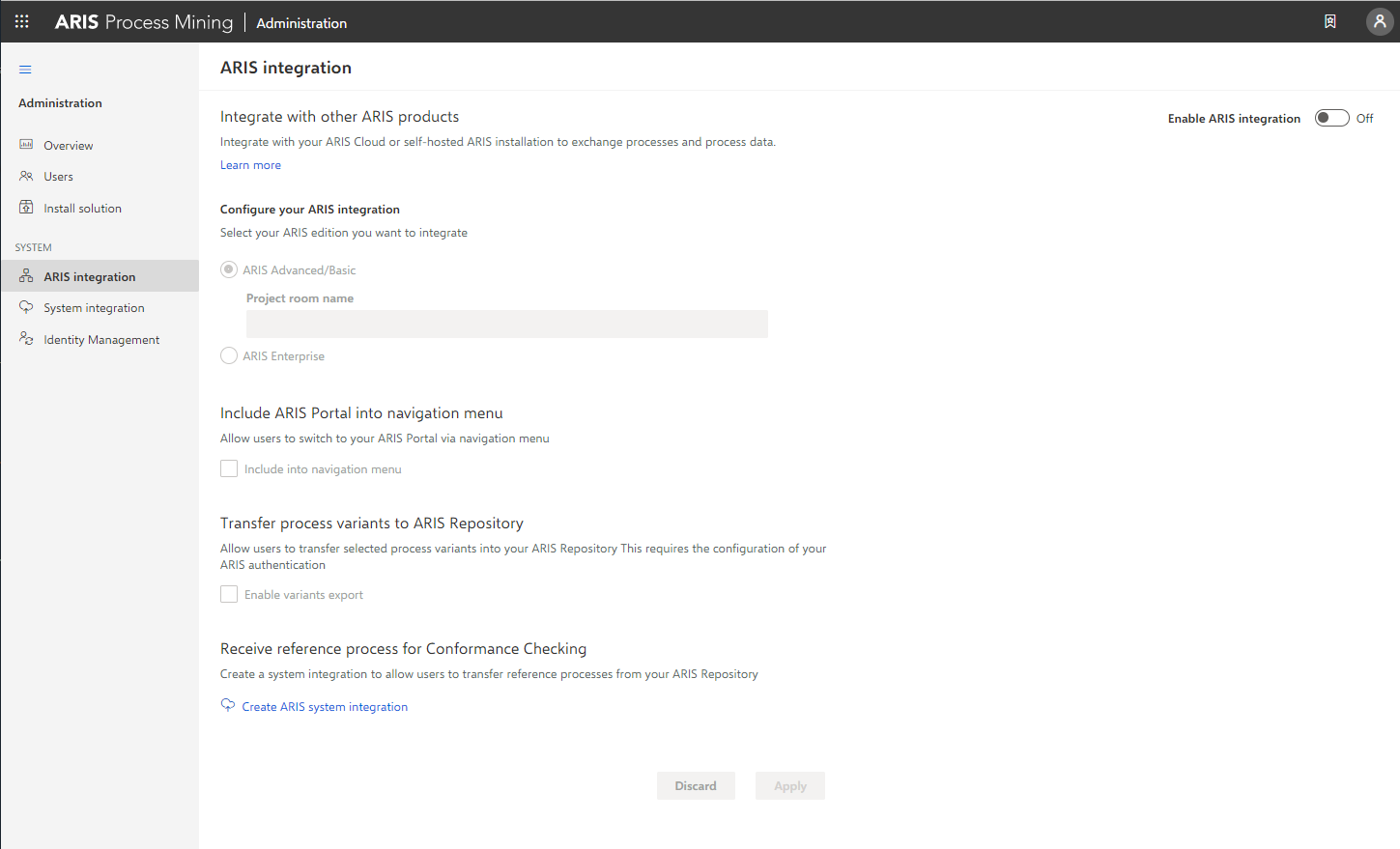
Connect ARIS Process Mining to ARIS Advanced and enable the link to ARIS Advanced
Specify the ARIS Advanced project room that you want to connect to and enable the link to ARIS Advanced that allows you to jump from ARIS Process Mining to ARIS Advanced.
Enable the Enable ARIS integration option.
Under Configure your ARIS integration, enable ARIS Advanced/Basic.
Enter the project room name you want to connect to, for example, my_ARIS_ProjectRoom.
Enable the Include ARIS in the navigation menu option.
Click Apply.
The link to ARIS Advanced is enabled.
Keep the ARIS Advanced integration page open.
To display the ARIS link in the Navigation menu (), you must reload the ARIS Process Mining tab. It may take a few minutes before the link is available in the menu.
Connect ARIS Advanced or Basic and enable the ARIS Portal link.
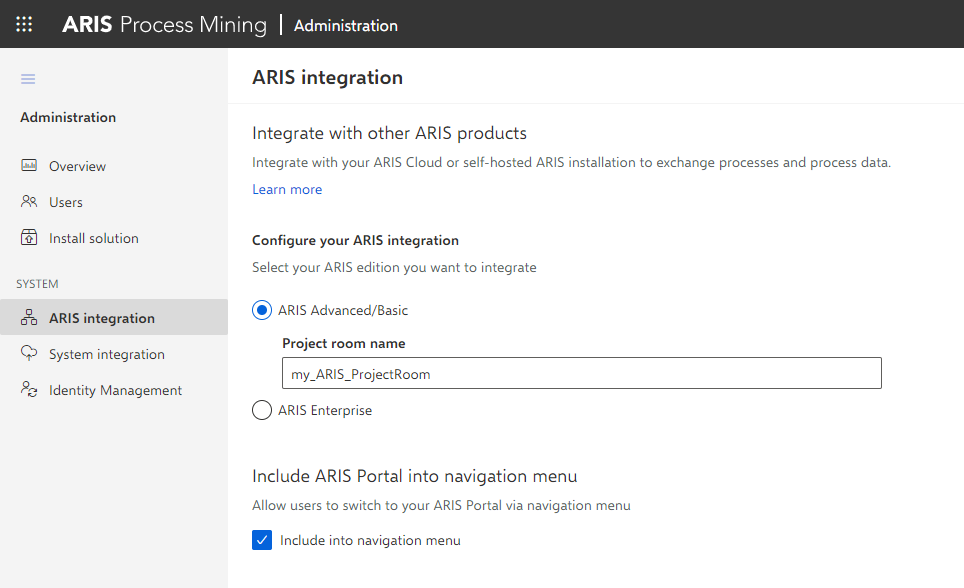
Open the ARIS Process Mining integration page in ARIS Advanced
Open ARIS Advanced in a separate tab of your web browser.
Click
Application launcher >  Administration.
Click Process Mining.
The ARIS Process Mining integration page opens.
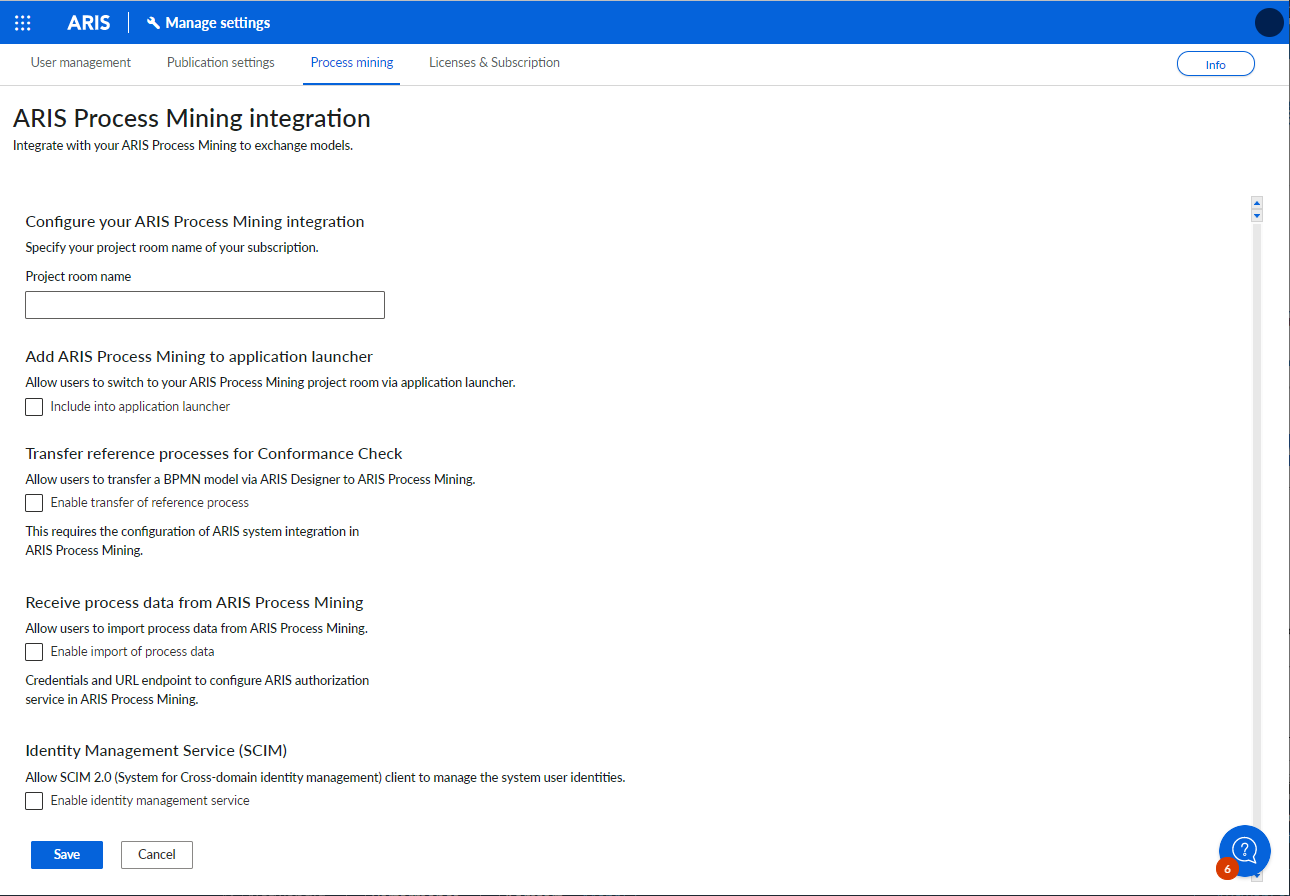
Connect ARIS Advanced to ARIS Process Mining and enable the link to ARIS Process Mining
Specify the ARIS Process Mining project room that you want to connect to and enable the link to ARIS Process Mining that allows you to jump from ARIS Advanced to ARIS Process Mining.
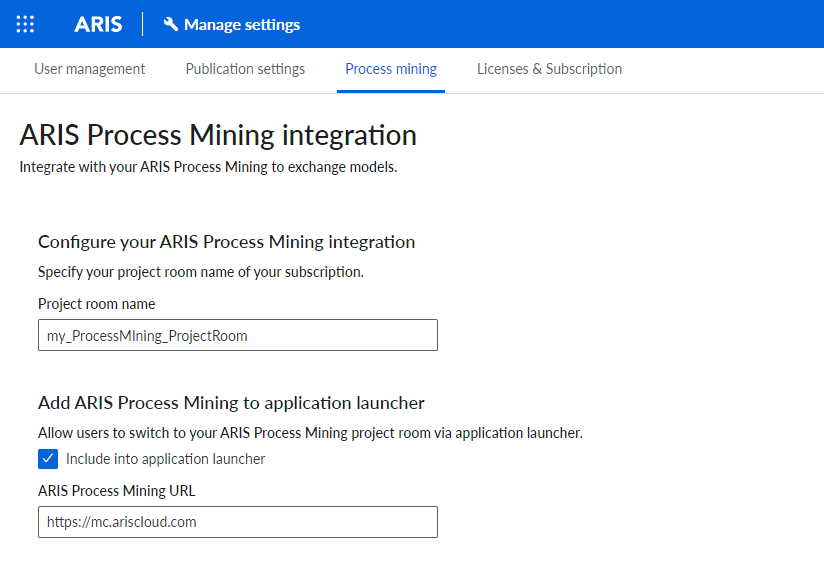
Under Configure your ARIS Process Mining integration, enter the name of the ARIS Process Mining project room you want to connect to, for example, my_ProcessMining_ProjectRoom.
Under Add ARIS Process Mining to application launcher, enable the Add to application launcher option.
Enter the ARIS Process Mining URL, for example, https://mc.ariscloud.com.
Click Save.
The link to ARIS Process Mining is enabled.
To display the link in the Application launcher menu, you need to reload the ARIS Advanced tab. It may take a few minutes before the link is available in the menu.
Connect ARIS Process Mining and enable the ARIS Process Mining link in ARIS Advanced.
Enable and configure the variant transfer
You must first enable the import of process data in ARIS Advanced before you can configure the variant transfer in ARIS Process Mining.
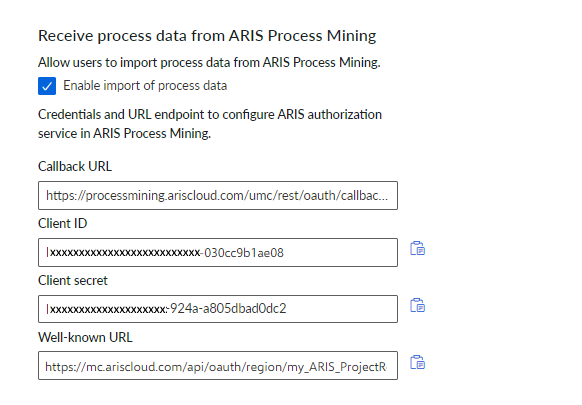
Under Receive process data from ARIS Process Mining, enable the Enable import of process data option.
Enter the Callback URL for your ARIS Process Mining project room.
https://<host name>/umc/rest/oauth/callback?tenant=<tenant ID>&provider=umc
Replace <host name> with the host name of the ARIS Process Mining installation. Default host name is processmining.ariscloud.com. Replace <tenant ID> with the name of the ARIS Process Mining project room for which you want to enable data transfer, for example, my_ProcessMining_ProjectRoom.
Example
https://processmining.ariscloud.com/umc/rest/oauth/callback?tenant=my_ProcessMining_ProjectRoom&provider=umc
Click Save.
A client ID, client secret, and well-known URL are provided. You need the access data in the next step to configure the process transfer in ARIS Process Mining. Copy the data to the clipboard and paste it into the corresponding fields on the ARIS Advanced integration page, as described in step 6 below.
Example
Open the ARIS Process Mining tab with the ARIS Advanced integration page.
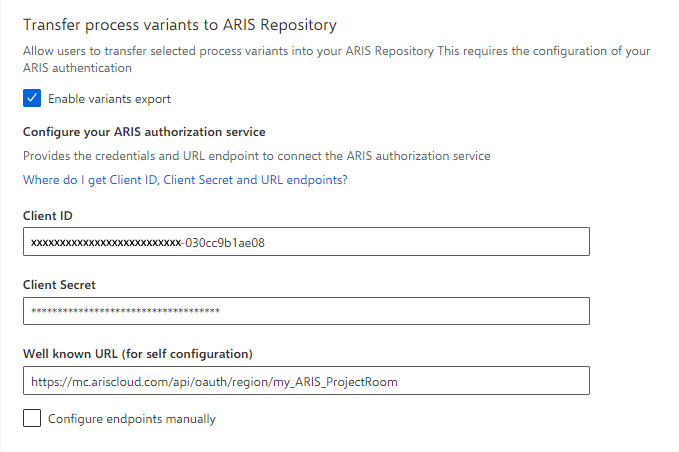
Under Transfer process variants to ARIS Repository, enable the Enable export of variants option.
Copy the client ID, client secret, and well-known URL provided on the ARIS Process Mining integration page and insert them in the corresponding input fields.
Example
Click Apply.
The variants transfer is enabled and configured.
Enable and configure process transfer for conformance analysis
You must first create an ARIS Advanced system integration in ARIS Process Mining before you can configure the process transfer in ARIS Advanced.
Prerequisite
The link to ARIS Process Mining must be enabled, as shown above.
Click
 Create ARIS system integration at the bottom of the ARIS integration page. The corresponding dialog opens.
Enter a name, for example, ARIS ConfCheck, and an optional description.
Ensure that Client credentials is selected as Grant type (OAuth).
Click Add. The ARIS Connect access data dialog opens.
The dialog provides the client ID and secret. Keep the dialog open. You need the access data in the next step to configure the process transfer in ARIS Advanced. Copy the data to the clipboard and paste it into the corresponding fields on the ARIS Process Mining integration page, as described in step 8 below.
Example
Access data of the ARIS system integration.
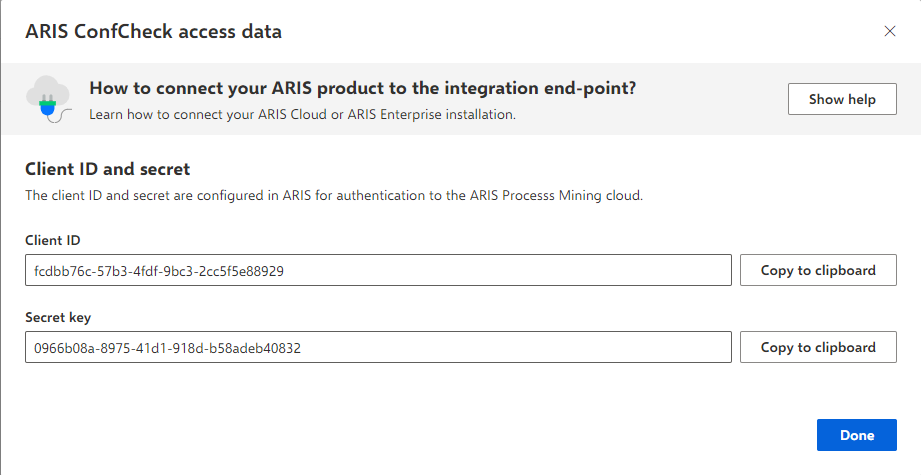
When you click Done, the dialog closes and the ARIS system integration is created and listed in the System integration component with the name you specified. You can ignore the status of the system integration displayed in the list.
Open the ARIS Advanced tab with the ARIS Process Mining integration page.
Ensure that the link to ARIS Process Mining is enabled, as shown above.
Under Transfer reference process for Conformance Check, enable the Enable transfer of reference process option.
Copy the client ID and secret provided from the ARIS Advanced system integration you created in ARIS Process Mining, as described in step 4. Insert the data in the corresponding input fields.
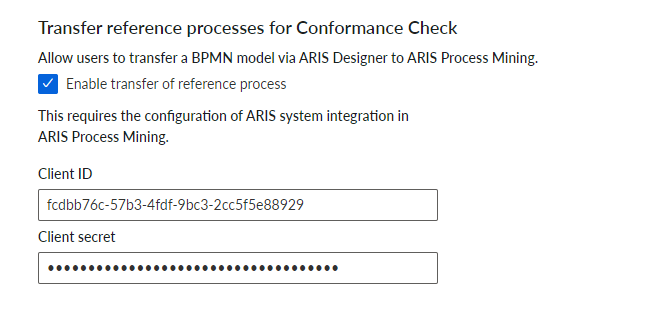
Click Save.
The process transfer for conformance analysis is enabled and configured.
You can now transfer BPMN models from ARIS Advanced to ARIS Process Mining. This feature enables you to perform a conformance check using ARIS Process Mining.
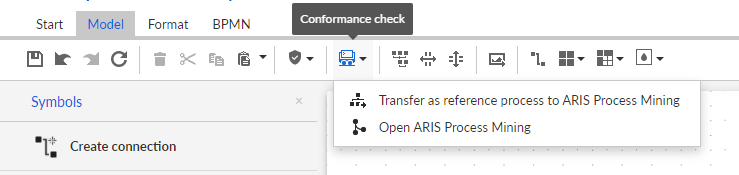
The  Transfer as reference process to ARIS Process Mining button is available in the ARIS Advanced Model designer. Open a BPMN model, open the Model tab, click the
  Conformance check button -> Transfer as reference process to ARIS Process Mining.