What to consider when modeling BPMN in ARIS Advanced
Various lane types exist:
Lanes that are not specified any further, in all model types
Lanes for roles, only in Enterprise BPMN collaboration diagrams and Enterprise BPMN process diagrams
Lanes for organizational units, only in Enterprise BPMN collaboration diagrams and Enterprise BPMN process diagrams
Lanes for positions, only in Enterprise BPMN collaboration diagrams and Enterprise BPMN process diagrams
Lanes for groups, only in Enterprise BPMN collaboration diagrams and Enterprise BPMN process diagrams
Lanes for application system types, only in Enterprise BPMN collaboration diagrams and Enterprise BPMN process diagrams
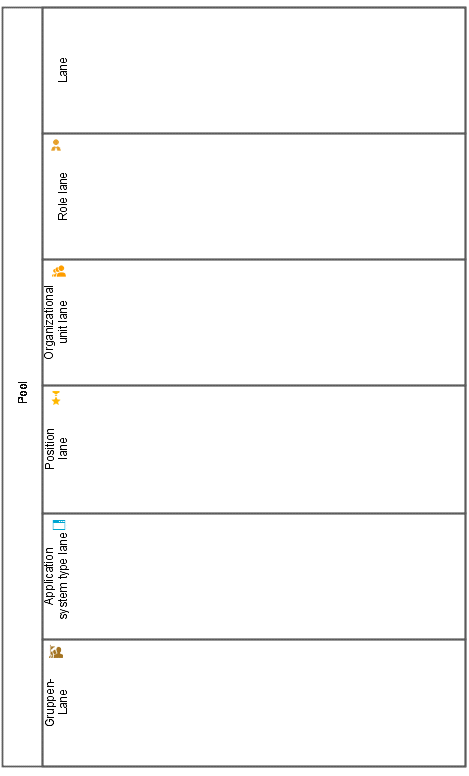
Since lanes are object types it is impossible to change the symbol.
The following implicit connections exist in diagrams of the Enterprise BPMN collaboration diagram, Enterprise BPMN process diagram, BPMN collaboration (BPMN 2.0), and BPMN process diagram (BPMN 2.0) type:
belongs to
carries out
supports
These connections belong to the lanes and are therefore moved together with them.
In a BPMN diagram, certain connections have an explicit semantic meaning. They are exclusively invisible or embedded connections.
Such connections are automatically created and deleted if objects are moved or resized.
Changes to visual relationships between an embedding object and an embedded object trigger the automatic creation or deletion of connections. These are:
Move
Change of size
Placement of an object
Create a definition copy
Create an occurrence copy
Use of drag and drop to drag an object into a BPMN diagram (in the Explorer)
Corresponding objects must be of the same type.
An object of the Message end event type, which generates a message, must be handled by an object of the Message start event type, which receives the message.
To avoid any inconsistencies, the modeler must observe constructs such as those shown in the example above.
Some attributes are fixed attributes of certain symbols. If you specify such an attribute, all occurrences of the same object definition must have the same symbol. The default symbol for this object definition is changed to this symbol.
The modeler cannot change the following attributes directly. Instead, they are specified automatically. Such attributes are displayed as read-only attributes:
Event type
Task type
Activity type
After you have created a new object definition, you can only change the attribute if there is only one occurrence of this definition. If there are several object occurrences, the system automatically tries to change all occurrence copies.
The following rules apply for changing symbols on occurrence copies:
If you change the type (for example, the symbol is changed from Message start event to Timer start event), the symbols in all occurrence copies are changed. At the same time, the symbols are changed in such a way that the visual display of their properties is unaffected. If you do not change the type (for example, the symbol is changed from Message start event to Message end event), only the symbol for the selected occurrence is changed.
Since only the type is changed, all other properties remain the same. A start event remains a start event (the same applies to intermediate events and end events). A catch event remains a catch event and a throw event remains a throw event. The same applies to the Interrupting and Non-interrupting properties. If any of these properties are not available, for example, because there is no such property for the new type, the symbol is still changed. In this case, the symbol that the user selected is now used.